
Introduction
In today’s digital age, cyber threats are growing rapidly, and one of the most common dangers is phishing attacks. These attacks are designed to trick people into sharing personal information such as passwords, bank details, or credit card numbers. Phishing attacks often look legitimate, making it difficult for even tech-savvy users to spot them. That’s why Phishing Attack Education is essential for everyone who uses the internet, whether for work, shopping, or social media.
Understanding phishing attacks can save you from financial loss, identity theft, and long-term digital security issues. Many beginners think phishing only happens through emails, but in reality, attacks can occur via text messages, social media, phone calls, and even fake websites. By learning how phishing works and how to protect yourself, you can reduce the risk of falling victim to these scams.
What is Phishing?
Phishing is a type of cyberattack where criminals attempt to deceive individuals into giving sensitive information. It is usually carried out through emails, instant messages, or fake websites that appear legitimate. The attackers create a sense of urgency or fear to push victims into responding quickly without thinking.
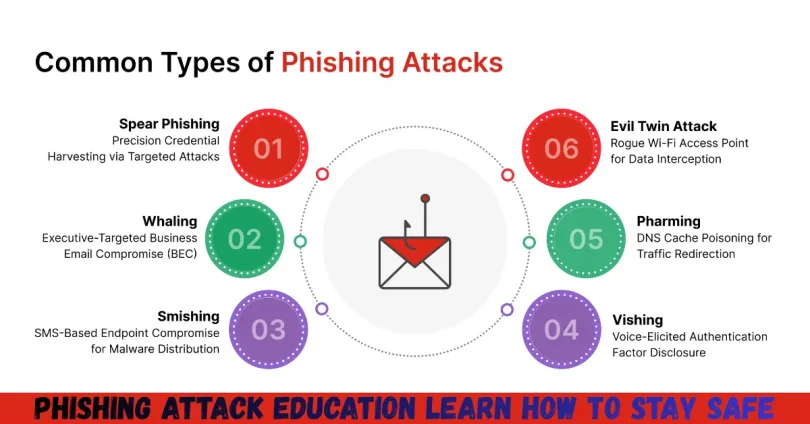
Phishing can take many forms:
- Email Phishing: The most common type, where attackers send fake emails that look like they are from banks, online stores, or social networks.
- Spear Phishing: A targeted attack aimed at a specific individual or organization using personalized information.
- Smishing: Phishing through SMS or text messages, often asking users to click a link or provide verification codes.
- Vishing: Voice phishing, where attackers call and impersonate trusted organizations to extract personal details.
- Website Phishing: Fake websites designed to look like legitimate services to steal login credentials.
Phishing attacks rely on human error rather than technical vulnerabilities. Even the most advanced security systems cannot prevent phishing if a user voluntarily shares sensitive information. That’s why phishing attack education is crucial for everyone, from beginners to experienced internet users.
Why is Phishing Attack Education Important?
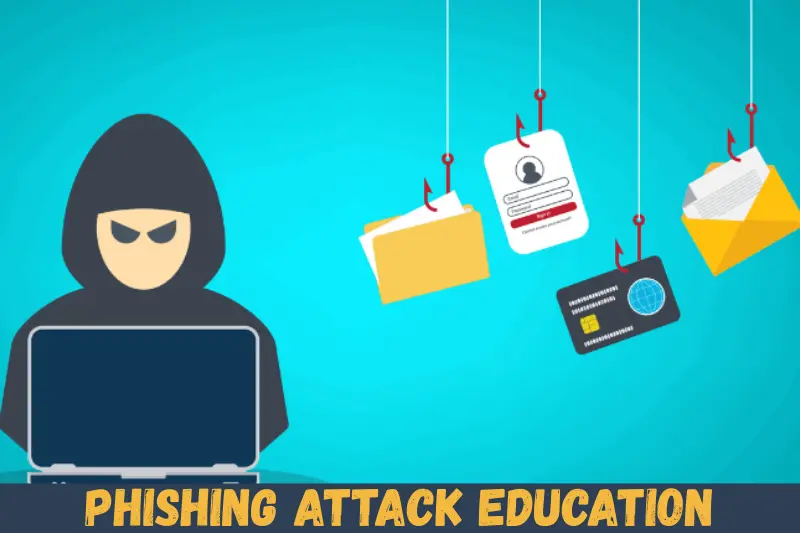
Understanding phishing attacks is not just about preventing financial loss; it’s about protecting your entire digital identity. Cybercriminals can use stolen information for a range of malicious activities:
- Stealing money from your bank accounts.
- Gaining access to sensitive work files or confidential information.
- Committing identity theft by using your personal details.
- Installing malware on your device to spy or steal information.
- Targeting your contacts with further phishing attacks.
Phishing attack education empowers you to:
- Recognize suspicious emails and messages.
- Avoid clicking on harmful links or downloading malicious attachments.
- Secure your accounts with strong passwords and two-factor authentication.
- Educate family and colleagues about phishing risks.
The internet is full of potential threats, and phishing attacks are becoming more sophisticated every day. Without proper education, you are more likely to become a victim, which can lead to long-term consequences such as compromised identity, financial loss, or damaged reputation.
Detailed Step-by-Step Guide to Phishing Attack Education
Step 1: Identify Suspicious Emails and Messages
The first step in phishing attack education is learning to spot suspicious communications. Look out for:
- Emails or messages with urgent requests (“Your account will be closed!”).
- Poor grammar, spelling mistakes, or awkward phrasing.
- Unknown senders or slightly altered email addresses.
- Requests for personal information like passwords or credit card numbers.
- Links or attachments that seem out of context.
Example: A phishing email might appear to come from your bank, asking you to verify your account immediately. The sender’s email may look legitimate, but a closer inspection reveals small discrepancies like “@bank-secure.com” instead of “@bank.com.”
Step 2: Verify Links and Websites
Before clicking on links:
- Hover over the link to see the actual URL.
- Check if the website uses HTTPS (secure connection).
- Compare the website with the official domain.
- Avoid shortened URLs from unknown sources.
Tip: If unsure, type the website address manually into your browser instead of clicking the link.
Step 3: Strengthen Your Email Security
- Use spam filters to reduce phishing emails.
- Enable two-factor authentication (2FA) for all important accounts.
- Use strong, unique passwords for each account.
- Avoid sharing passwords across multiple platforms.
Strong email security makes it harder for attackers to gain unauthorized access even if they attempt phishing.
Step 4: Educate Yourself on Common Phishing Tactics
- Clone Phishing: Copying a legitimate email to make it appear authentic.
- Pop-up Phishing: Fake pop-ups requesting login details.
- Social Media Phishing: Fake friend requests or messages with malicious links.
- Credential Harvesting: Attackers create fake login pages to steal usernames and passwords.
Knowing these tactics helps you stay alert and recognize attacks quickly.
Step 5: Report and Block Phishing Attempts
- Mark suspicious emails as spam or phishing in your email client.
- Report phishing websites to cybersecurity organizations.
- Inform your IT department if attacks target your workplace.
Reporting attacks helps prevent others from becoming victims and contributes to broader online safety.
Step 6: Regularly Monitor Your Accounts
- Check bank statements, credit reports, and account activity regularly.
- Set up alerts for unusual login attempts or transactions.
- Immediately report any suspicious activity.
Early detection reduces the impact of phishing attacks and allows you to act before major damage occurs.
Step 7: Practice Safe Online Habits
- Avoid clicking on links in unsolicited emails.
- Do not download attachments from unknown sources.
- Keep software and antivirus programs updated.
- Use secure networks instead of public Wi-Fi for sensitive transactions.
Combining technical safeguards with awareness is the most effective defense against phishing attacks.
Benefits of Phishing Attack Education
- Enhanced Security: Protects personal and financial information.
- Prevents Identity Theft: Reduces chances of criminals stealing your identity.
- Increased Awareness: Helps identify scams across email, SMS, and social media.
- Safe Online Habits: Encourages cautious internet behavior.
- Peace of Mind: Reduces fear of online threats and builds confidence.
- Better Workplace Security: Educated employees reduce organizational cyber risks.
Disadvantages / Risks of Phishing Attacks
- Financial Loss: Attackers can drain bank accounts or make unauthorized purchases.
- Identity Theft: Personal information can be misused for fraudulent activities.
- Reputational Damage: Sensitive professional or personal data may be exposed.
- Data Breaches: Compromised accounts can lead to larger security issues.
- Malware Infection: Phishing can install viruses, ransomware, or spyware.
- Time and Stress: Dealing with phishing fallout consumes time and causes anxiety.
Common Mistakes to Avoid
- Ignoring suspicious emails thinking they are harmless.
- Clicking links without verifying the source.
- Using the same password across multiple accounts.
- Sharing sensitive information via email or social media.
- Failing to update software or security tools.
- Assuming phishing only happens to beginners or less tech-savvy users.
Avoiding these mistakes is essential for strong phishing attack defense.
FAQs About Phishing Attack Education
1. How can I tell if an email is a phishing attempt?
Look for urgent requests, unknown senders, spelling mistakes, suspicious links, or unexpected attachments. Always verify the sender and hover over links before clicking.
2. What should I do if I clicked a phishing link?
Immediately disconnect from the internet, change your passwords, scan your device for malware, and report the incident to your email provider or bank.
3. Is phishing only done via email?
No. Phishing can occur through text messages (smishing), phone calls (vishing), social media, or fake websites. Attackers exploit any communication channel.
4. Can antivirus software prevent phishing?
Antivirus software helps, but it cannot stop phishing completely. Human awareness and careful behavior are the most effective defenses.
5. How often should I educate myself about phishing?
Cyber threats evolve constantly, so regular updates on phishing tactics and security practices are recommended. Attend workshops, read online resources, and stay informed.
6. What is the difference between phishing and spear phishing?
Phishing targets a wide audience with generic messages, while spear phishing targets specific individuals or organizations using personalized information to increase success.
7. Are social media accounts at risk from phishing?
Yes. Attackers can send fake messages, impersonate friends, or create fake login pages to steal credentials. Always verify before clicking.
8. How can I teach others about phishing?
Share phishing attack education tips with family, colleagues, and friends. Use examples of phishing attempts and encourage safe online behavior.
Expert Tips & Bonus Points
- Always check the sender’s email address and look for subtle discrepancies.
- Use password managers to create and store strong, unique passwords.
- Enable multi-factor authentication for every account that supports it.
- Never provide personal information in response to unsolicited requests.
- Keep software, browsers, and security tools up to date.
- Educate your team or family by simulating phishing scenarios.
- Backup important files regularly to mitigate damage from potential attacks.
Bonus Tip: Train yourself to pause and think before clicking any link or providing information. Most successful phishing attacks rely on impulsive actions.
Conclusion
Phishing attack education is no longer optional—it is a critical skill for anyone using the internet. Phishing attacks are becoming increasingly sophisticated, targeting individuals, businesses, and organizations worldwide. By understanding what phishing is, recognizing common tactics, and practicing safe online behavior, you can protect your personal information and maintain digital security.
Education empowers you to detect phishing attempts before they cause harm. Regularly updating your knowledge, using strong passwords, enabling two-factor authentication, and staying cautious with emails and links reduces your risk significantly. Beyond personal safety, phishing attack education also strengthens organizational security, ensuring a safer digital environment for everyone.